IAA-Plus base settings
Here you store the access to the customs service, your EORI number and the default entries that will appear on every new delivery. The settings apply per company: if you run several companies in one database, repeat the setup for each of them.
Prerequisite
You need administrator rights and the credentials for the customs service (address and key). GlobalBases provides these.
Open the settings section
- Open Settings.
- Select the IAA-Plus section in the left-hand column.
The section consists of three blocks: Settings, Einstellungen Allgemein (general settings) and Vorbelegung Allgemein (general default entries).
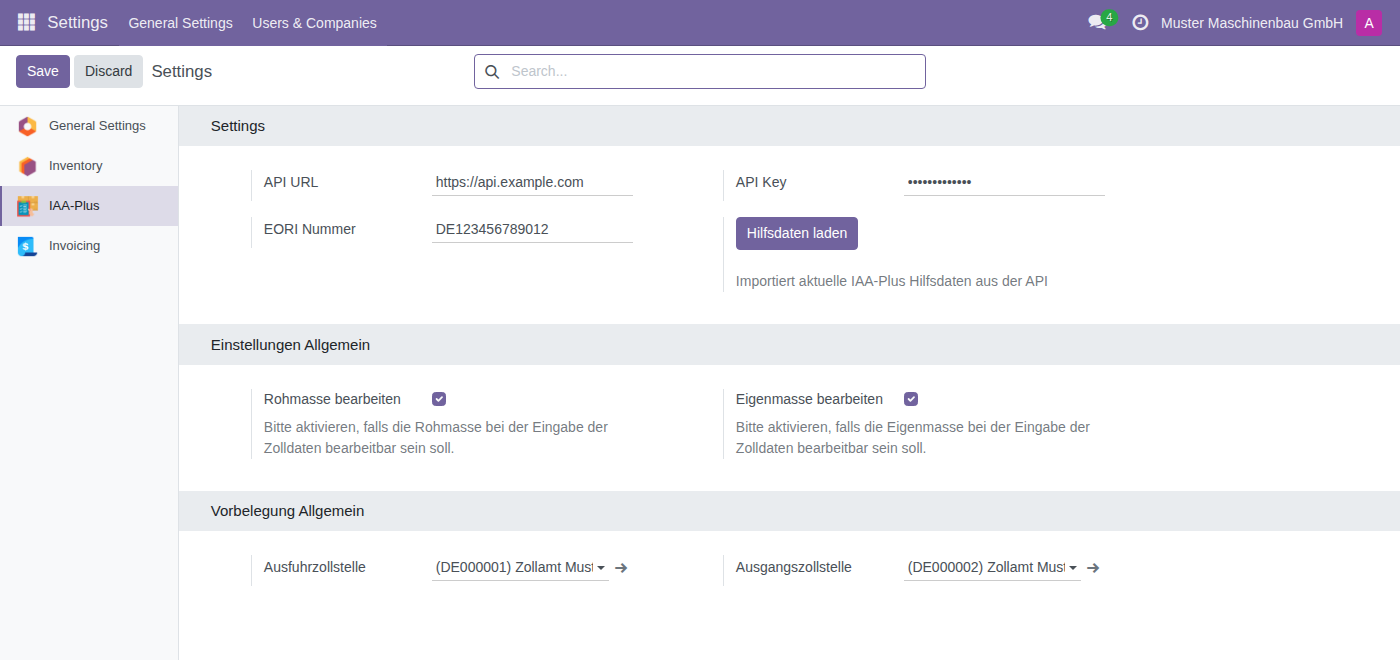
Store the access to the customs service
- Under API URL, enter the address of the customs service, for example
https://api.example.com. - Under API Key, enter the matching key. The entry is masked.
- Under EORI Nummer (EORI number), enter your company's EORI number, for example
DE1234567. - Click Save.
Important
Without an API URL neither the validation nor the XML generation works. The corresponding buttons on the delivery then have no effect. Check this entry first if nothing happens when you run the check.
Make the masses editable
In the Einstellungen Allgemein block you decide whether gross and net mass may be changed by hand in the declaration. Without these checkboxes the values are calculated exclusively from the product master data and are read-only in the declaration.
- Tick Rohmasse bearbeiten (edit gross mass) if the gross mass should be editable when entering customs data.
- Tick Eigenmasse bearbeiten (edit net mass) if the net mass should be editable.
- Click Save.
Tip
Tick at least Rohmasse bearbeiten. In practice the actual weighed shipping weight regularly differs from the sum of the product weights, and only this checkbox lets you correct it in the declaration. For how a manually entered total gross mass affects the individual items, see Entering header data.
Set the default customs offices
In the Vorbelegung Allgemein block you define the customs offices that are copied into every newly created delivery. Where the export route stays the same, this saves you the selection on every case.
- Under Ausfuhrzollstelle (export customs office), select the office to which you usually submit your export declarations.
- Under Ausgangszollstelle (exit customs office), select the office through which your goods usually leave the customs territory of the Union.
- Click Save.
Note
Both dropdown lists are filled from the official code lists. If they are empty, first load the reference data. The default entries apply to new deliveries only; existing cases stay unchanged. You can choose different customs offices in any individual declaration.
Load the reference data
The Hilfsdaten laden (load reference data) button in the Settings block imports the current IAA-Plus reference data. What happens then, and when you should use the button, is described under Reference data and code lists.
Checklist
The setup is complete when:
- API URL, API Key and EORI Nummer are filled in and saved,
- the reference data has been loaded at least once,
- Ausfuhrzollstelle and Ausgangszollstelle are set,
- the checkboxes for gross and net mass match the way you work.