Customs data on contacts
Every party to an export declaration — declarant, exporter, subcontractor, consignor and consignee — is a contact in Odoo. So that the declaration can copy their data automatically, store the customs-relevant details on the contact.
Note
The Zoll tab only appears on contacts of type Company, not on individuals. This matches the logic of the declaration: parties are companies, individuals come into play as contact persons.
Open the Zoll tab
- Open the Contacts app.
- Open the company concerned.
- Switch to the Zoll tab.
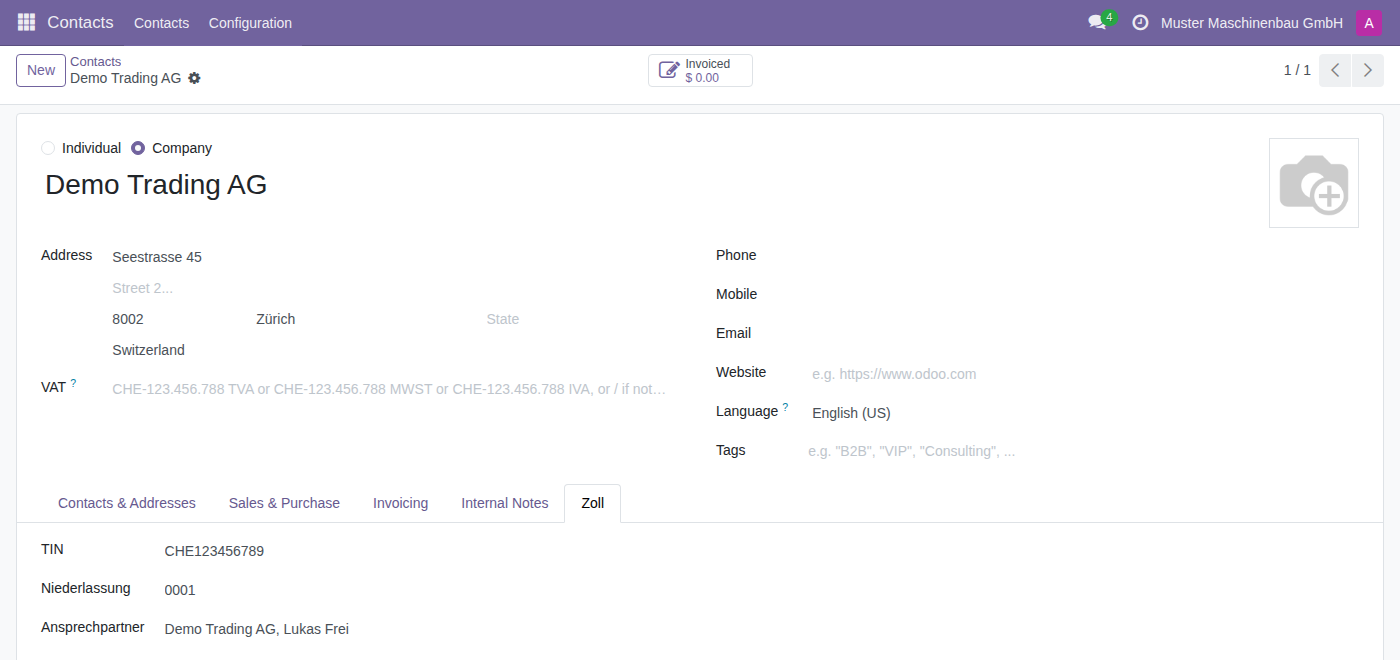
The fields in detail
| Field | Meaning |
|---|---|
| TIN | The trader identification number, as a rule the company's EORI number. |
| Niederlassung (branch) | The four-digit branch number, if several branches are registered for this company. |
| Ansprechpartner (contact person) | The contact person for this company. Only contacts of type individual can be selected. |
Complete a contact
- Under TIN, enter the company's identification number.
- Add the Niederlassung if needed.
- Under Ansprechpartner, select the contact person. If they do not exist yet, create them first as a contact under the company.
- Make sure the contact person has a Job Position, Phone and Email — this data is copied into the declaration.
- Check that street, postcode, city and Country of the company are complete.
- Click Save.
How the data reaches the declaration
As soon as you select a company as a party in the declaration, the module fills the related fields itself:
- TIN and Niederlassungsnr from the contact's Zoll tab,
- Name, Straße, PLZ, Ort and Land from the contact's address,
- Name, Stellung, Telefon and eMail of the contact person from the contact person stored on the company.
If a TIN is stored on the contact, the TIN liegt vor (identification number available) flag applies in the declaration. The party's address fields are then hidden, because the identification number replaces the address. Without a TIN the declaration requires the full address.
Tip
Maintain the TIN first for the contacts you use most: your own company (it is the Anmelder, the declarant, by default), your exporters and your regular consignees in third countries.
Important
The consignee's Country determines whether a delivery is treated as a customs declaration at all: when a delivery is created, the Zollanmeldung flag is set automatically if the consignee's country differs from your company's country. A missing country on the contact therefore leads to deliveries without a customs tab.
Your own company
Your own company is a contact too, and it is preset as the Anmelder (declarant) in the declaration. Maintain there:
- the TIN (your EORI number),
- the Niederlassung where applicable,
- the Ansprechpartner available to customs for queries,
- a complete address including Country — the Ausfuhrland (country of export) of every new delivery is derived from it.